Creating videos for social media has become a part of everyday life. Many people upload videos to YouTube, Instagram Reels, TikTok, Facebook, and WhatsApp every day. However, one common problem that creators face is video size. YouTube works best with landscape (16:9) videos, while Instagram Reels, TikTok, and YouTube Shorts mainly use vertical (9:16) videos. Because of this difference, many creators have to record the same video twice. This takes extra time and effort.
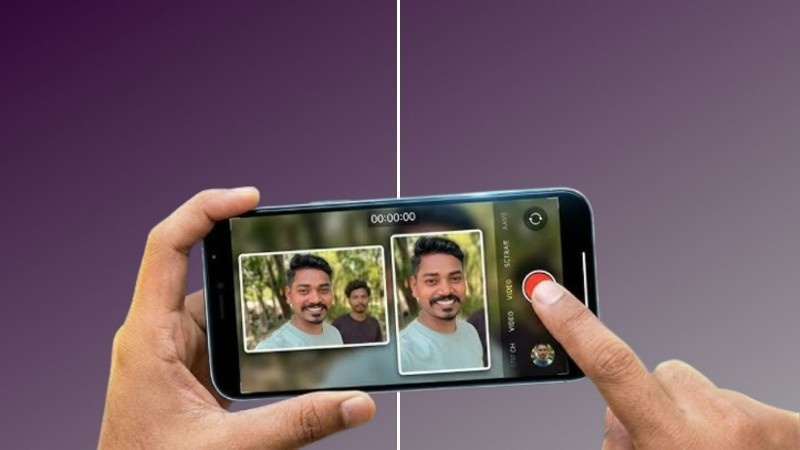
A Dual Shot Recorder app solves this problem by recording both landscape and portrait videos at the same time. With one recording session, you get two versions of the same video. This saves time, keeps your content consistent, and makes it easier to publish on different platforms.
In this article, we will understand what a Dual Shot Recorder is, how it works, its main features, benefits, use cases, limitations, and whether it is worth using.
What is a Dual Shot Recorder?
A Dual Shot Recorder is a video recording application that allows you to record one scene in two different aspect ratios at the same time. Instead of creating only one video, the app generates both a horizontal (landscape) version and a vertical (portrait) version.
Normally, if you want to upload content to YouTube and Instagram Reels, you have to record twice or edit the same video into different sizes later. A Dual Shot Recorder removes this extra work by preparing both versions automatically during recording.
This makes it a very useful app for YouTubers, social media creators, educators, online businesses, and anyone who regularly uploads videos to multiple platforms.
Why Do People Need This App?
Today’s content creators publish videos on many different platforms. Each platform has its own preferred video format.
For example, YouTube videos usually look better in landscape mode, while Shorts, Reels, and TikTok videos perform best in portrait mode. Switching between these formats can become frustrating if you need to create the same content again and again. A Dual Shot Recorder helps by giving both versions from one recording session. This saves editing time and allows creators to upload faster. If you are creating daily content, this simple feature can save several hours every week.
How Does Dual Shot Recorder Work?
The app uses your phone’s camera to capture the video once. During recording, it processes the footage and creates two separate outputs.
One output is saved in landscape format for platforms like YouTube or Facebook.
The second output is saved in portrait format for Instagram Reels, TikTok, YouTube Shorts, or WhatsApp Status.
Some apps use intelligent cropping while others use camera framing techniques to keep the important subject visible in both versions.
After recording is complete, both videos are saved separately inside your phone.
Main Features of Dual Shot Recorder
One of the biggest highlights of the app is simultaneous dual recording. Instead of recording two videos manually, the app creates both versions automatically. This is the feature that makes the application different from ordinary camera apps.
Many versions also include high-quality video recording with support for HD or Full HD resolution. This allows creators to upload videos without losing much quality.
Some apps provide live preview during recording. Users can see how both video formats will appear before they start recording.
Simple camera controls make the app beginner-friendly. Even users with no video editing experience can start recording within minutes.
Certain versions also include useful options such as autofocus, exposure control, timer, flash support, grid lines, and microphone selection to improve recording quality.
Some apps even allow direct sharing to social media after recording is complete, making the publishing process even faster.
Benefits of Using Dual Shot Recorder
The biggest benefit is time saving. Since both video formats are recorded together, creators do not need to shoot the same scene multiple times.
Another advantage is consistency. Both videos are created from the same recording, so lighting, camera angle, facial expressions, and movements remain identical.
This is especially useful for product reviews, educational videos, interviews, tutorials, and unboxing videos.
The app also reduces editing work. Instead of cropping videos manually inside editing software, users receive ready-to-upload files.
Content creators who upload several videos every week can significantly improve their workflow using this method.
Who Should Use Dual Shot Recorder?
This type of app is useful for many different users.
YouTubers can record landscape videos for their main channel while also creating vertical Shorts from the same recording.
Instagram creators can produce Reels without recording separately.
TikTok creators can publish videos quickly while maintaining good framing. Teachers and online educators can create learning videos for different platforms without repeating lessons. Business owners can create promotional videos once and publish them across multiple social media platforms. Affiliate marketers, freelancers, bloggers, and digital marketers can also save valuable production time. Even casual users who like sharing family videos or travel memories may find the app helpful.
How to Use Dual Shot Recorder
Using the app is usually very simple. First, download and install the application from your device’s app store. After opening the app, allow camera, microphone, and storage permissions. Choose your preferred recording quality such as HD or Full HD if available. Position your phone carefully so that the important subject stays near the center of the frame. This helps both landscape and portrait videos look better. Press the record button and record your video normally.
Once recording is complete, stop recording and wait a few seconds while the app processes the files. Both landscape and portrait videos will then be saved separately in your gallery. You can upload each version directly to the platform that needs it.
Best Tips for Better Results
To get the best output, use good lighting while recording. Bright environments help produce sharper videos. Keep your phone stable by using a tripod whenever possible. Stable videos always look more professional.
Avoid placing important objects near the edges of the frame because they may not appear correctly in both video formats. Record in a quiet environment for better audio quality.
Always check both output videos before uploading them online.
Real-Life Use Cases
Imagine you are recording a smartphone review. You can upload the landscape version to your YouTube channel while posting the portrait version as a YouTube Short and Instagram Reel. If you are a cooking creator, one recording session can produce content for YouTube, Facebook, TikTok, and Instagram without any extra work. Teachers can record one educational lesson and share it on different learning platforms in multiple formats.
Small businesses can create one promotional video and publish it everywhere instead of making different videos for every platform.
Are There Any Limitations?
Although the app offers many advantages, it also has a few limitations.
Some older smartphones may not support smooth dual recording because the process requires more processing power. Recording two video formats at once may consume more storage space compared to recording a single video.
Battery usage may also increase during long recording sessions. Free versions of some apps may include advertisements or limit certain advanced features. Depending on the app, video processing may take a little extra time after recording finishes.
Is Dual Shot Recorder Safe to Use?
Most Dual Shot Recorder apps are safe if downloaded from trusted app stores such as Google Play. Before installing any app, check user reviews, developer information, and the permissions it requests.
The app usually needs access to the camera, microphone, and storage because these permissions are necessary for recording videos. Avoid downloading modified or unofficial versions from unknown websites, as they may contain security risks.
Is It Worth Using?
If you regularly create videos for multiple social media platforms, a Dual Shot Recorder can make your work much easier. Instead of spending extra time recording the same content twice or editing different aspect ratios manually, you can complete everything in a single recording session.
It is especially valuable for YouTubers, Instagram creators, TikTok users, online teachers, marketers, and businesses that publish content every day. The time saved can be used for creating more content instead of editing videos.

The Final Thoughts
A Dual Shot Recorder is a smart solution for modern content creators. As social media platforms continue to grow, creators often need the same video in different formats. Recording twice is not only time-consuming but also reduces productivity.
By recording both landscape and portrait videos at the same time, this type of app simplifies the entire workflow. It saves time, reduces editing effort, keeps content consistent, and helps creators publish faster across multiple platforms.
Whether you are just starting your content creation journey or already manage several social media accounts, a Dual Shot Recorder can become a useful addition to your smartphone. It helps you work smarter, create content more efficiently, and focus on producing better videos instead of repeating the same recording process.