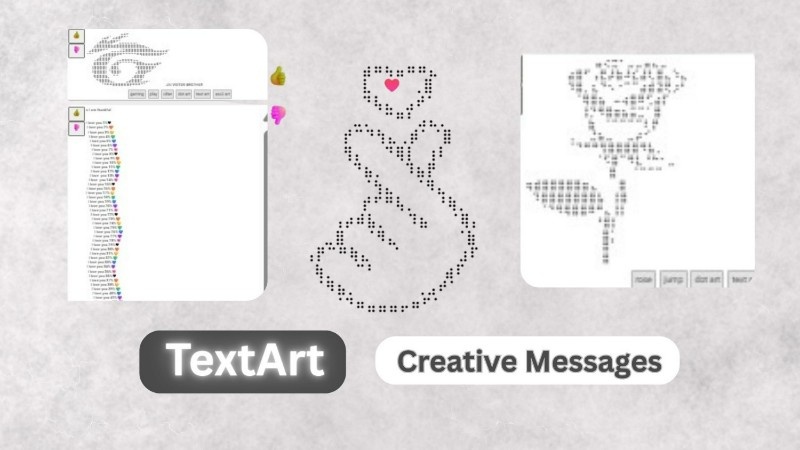
When you use social media, chats, or websites, you may sometimes see stylish text made using symbols, letters, and special characters. This creative style of writing is called TextArt. It looks different from normal typing and helps people express ideas in a more fun and attractive way.
Today, TextArt is becoming very popular because people want their messages, bios, posts, and designs to look unique. Even without graphic design skills, anyone can create beautiful text designs using simple characters.
In this article, we will understand what TextArt is, how it works, where it is used, and how beginners can start using it easily.
What is TextArt?
TextArt is a way of creating designs, shapes, or stylish writing using only text characters, symbols, and keyboard signs. Instead of using images or drawings, TextArt uses letters, numbers, emojis, and symbols to create visual designs.
In simple words, TextArt turns normal text into creative art.
For example, people use symbols to create hearts, stars, faces, borders, or stylish names. Earlier, TextArt was very common in old computer systems and chat rooms, but now it is again trending on social media platforms.
TextArt can be simple or very detailed depending on creativity.
Why TextArt is Popular Today
Many users want their online content to look different from others. Normal text looks plain, but TextArt gives personality and style.
Some main reasons for its popularity are:
- Makes social media profiles look attractive
- Helps messages stand out in chats
- Easy to create without design software
- Works on most devices and platforms
- Gives creative identity online
Because of these reasons, TextArt is widely used by students, creators, gamers, and bloggers.
Types of TextArt
TextArt is not only one style. There are different ways people create it depending on their purpose.
1. Stylish Text Fonts
These are normal words converted into decorative styles using Unicode characters. People often use them in Instagram bios, usernames, and captions.
Example:
- 𝓢𝓽𝔂𝓵𝓲𝓼𝓱 𝓣𝓮𝔁𝓽
- 𝐁𝐨𝐥𝐝 𝐒𝐭𝐲𝐥𝐞
- 🅣🅔🅧🅣 🅐🅡🅣
2. ASCII Art (Picture Made From Text)
This style creates images using characters.
Example ideas:
- Hearts ❤️
- Anime faces
- Animals
- Cartoon designs
These designs look like drawings but are actually text characters.
3. Symbol Decorations
Users combine symbols to create borders and separators.
Examples:
✦ ─── ✦ ─── ✦
♥ ★ ♥ ★ ♥
       ♥♥♥     ♥♥♥
    ♥♥♥♥♥♥♥ ♥♥♥
   ♥♥♥♥♥♥♥♥♥♥♥
   ♥♥♥♥♥♥♥♥♥♥♥
    ♥♥♥♥♥♥♥♥♥♥
      ♥♥♥♥♥♥♥♥
        ♥♥♥♥♥♥
          ♥♥♥♥
            ♥♥
/\_/\
( o.o )
> ^ <
/\ /\
{ `---' }
{ O O }
~~> V <~~
\ \|/ /
`-----'____
/ \ \_
{ }\ )_\_ _
| \_/ |/ / \_\_/ )
\__/ /(_/ \__/
(__/ .:::. .:::.
::::::::: :::::::::
::::::::::::::::::::::::
::::::::::::::::::::::::
::::::::::::::::::::::
:::::::::::::::::::
:::::::::::::::
:::::::::::
:::::::
:::
❤️────────❤️────────❤️
❤️────────❤️────────❤️
❤️────────❤️────────❤️
❤️────────❤️────────❤️
❤️❤️❤️❤️❤️❤️❤️❤️❤️❤️❤️
────❤️────────────❤️────
────❤️────────────❤️────
────❤️────────────❤️────
────❤️────────────❤️────
❤️❤️❤️❤️❤️❤️❤️❤️❤️❤️❤️
❤️────────❤️────────❤️
❤️────────❤️────────❤️
❤️────────❤️────────❤️
❤️────────❤️────────❤️
❤️❤️❤️❤️❤️❤️❤️❤️❤️❤️❤️❤️❤️
❤️❤️❤️❤️❤️❤️❤️❤️❤️❤️❤️❤️❤️
❤️❤️──────────────❤️❤️
❤️❤️──────────────❤️❤️
❤️❤️❤️❤️❤️❤️❤️❤️❤️❤️❤️❤️❤️
────❤️❤️❤️❤️❤️❤️❤️❤️❤️────
────❤️❤️❤️❤️❤️❤️❤️❤️❤️────
❤️❤️❤️❤️❤️❤️❤️❤️❤️❤️❤️❤️❤️
❤️❤️──────────────❤️❤️
❤️❤️──────────────❤️❤️
❤️❤️❤️❤️❤️❤️❤️❤️❤️❤️❤️❤️❤️
        ⬛⬛⬛
       ⬛⬛⬛⬛⬛
          ⬛⬛
          ⬛⬛
        ⬛⬛⬛⬛⬛
      ⬛⬛  ⬛⬛  ⬛⬛
     ⬛⬛    ⬛⬛    ⬛⬛
            ⬛⬛
            ⬛⬛
          ⬛⬛  ⬛⬛
        ⬛⬛      ⬛⬛


        🟫🟫🟫🟫🟫
        🟫⬜⬜⬜🟫
        🟫⬜⬛⬜🟫
        🟫🟫🟫🟫🟫
        🟦🟦🟦🟦🟦
        🟦🟦🟦🟦🟦
      🟦🟦      🟦🟦
      🟦🟦      🟦🟦
        🟦        🟦
        🟦        🟦
      🟦🟦        🟦🟦
❤️────────────❤️────────────❤️
──❤️────────❤️────❤️────────❤️──
────❤️────❤️────────❤️────❤️────
──────❤️❤️────────────❤️❤️──────
────❤️────❤️────────❤️────❤️────
──❤️────────❤️────❤️────────❤️──
❤️────────────❤️────────────❤️Why TextArt is So Popular Today
Today everyone wants attention on social media. Simple text looks boring, but creative text attracts eyes quickly.
TextArt helps users:
- Make profile bios stylish
- Create unique comments
- Express emotions in a fun way
- Stand out from other users
- Add personality without editing apps
Because it works on almost every phone and platform, anyone can use it easily.
Where Can You Use TextArt?
TextArt is useful in many online places. You don’t need professional skills to use it.
Instagram Bio
Many users create stylish names, symbols, or decorative lines in their bio to look unique.
Example ideas:
- Stylish name designs
- Heart or star borders
- Cool attitude text styles
A creative bio increases profile attraction and makes visitors remember your account.
Social Media Comments
TextArt comments look different from normal comments. That is why they get more attention.
People use TextArt for:
- Birthday wishes
- Good morning messages
- Funny replies
- Fan comments
A creative comment often gets more likes and replies.
WhatsApp & Telegram Messages
Instead of sending plain messages, users send TextArt designs like hearts, animals, or greeting art.
This makes conversations more fun and emotional.
Gaming Profiles & Usernames
Gamers love TextArt because it gives a cool identity. Stylish symbols and fonts make usernames look powerful and creative.
How to Create TextArt (Step-by-Step)
Creating TextArt is very easy today because many free tools are available online.
Step 1: Choose Your Text
Write the word or message you want to design.
Step 2: Open a TextArt Generator Website
Use online tools that automatically convert text into designs.
Step 3: Select Style or Design
Choose fonts, ASCII art, or symbol designs.
Step 4: Copy the TextArt
Click copy button.
Step 5: Paste Anywhere
Paste it into Instagram bio, comments, or messages.
No installation or software is required.
Popular TextArt Websites
Some websites help you create TextArt instantly:
- TextArt generators (stylish font tools)
- ASCII art creator websites
- Fancy text converter tools
- Symbol and emoji design platforms
These tools allow one-click copy and paste designs for social media use.
Tips to Make Your TextArt Look Better
- Do not use too many symbols in one line
- Keep designs readable
- Use spacing properly
- Test before posting
- Choose designs matching your personality
Simple and clean TextArt always looks more professional.
Benefits of Using TextArt
TextArt is not only fun but also useful:
- Makes profile visually attractive
- Helps content stand out
- Improves engagement naturally
- Easy for beginners
- Completely free to use
It allows anyone to become creative without learning graphic design.
Final Thoughts
TextArt is a simple but powerful way to make your online presence more creative. With just text characters, you can design stylish bios, attractive comments, and fun messages that catch attention instantly.
The best part is that anyone can start using TextArt within minutes. You only need creativity and the right tools. Whether you want to make your Instagram bio cool, send unique messages, or create eye-catching posts, TextArt is an easy and fun solution.
As social media continues to grow, creative text styles like TextArt will remain a popular way to express personality online.