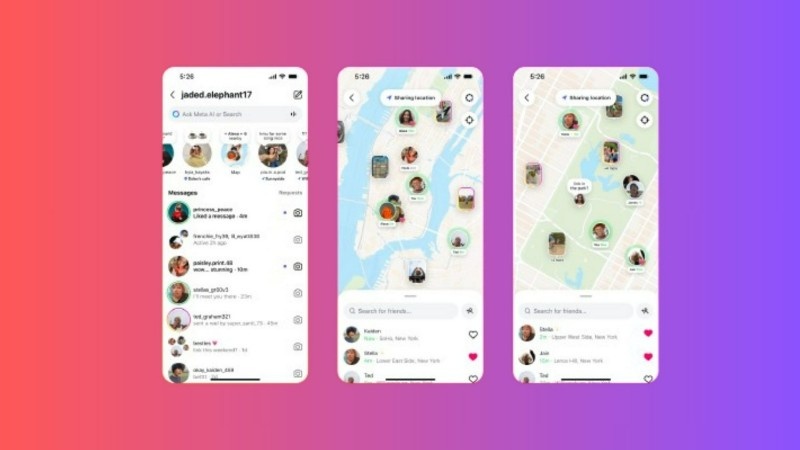
Instagram is not just for photos anymore — it’s now becoming a discovery tool. One of the most interesting updates is the Instagram Map feature, which helps users explore nearby places, see popular spots, and find posts tagged in their area. This feature works almost like Google Maps but inside Instagram itself.
It’s a fun and useful tool, especially for people who love traveling, finding new cafés, or exploring local areas. But at the same time, many users are also talking about privacy and safety, which is equally important. Let’s understand everything about this feature in simple words.
What Is the Instagram Map Feature?
The Instagram Map is like a live map filled with posts and stories that are tagged with locations. When someone shares a photo or reel and adds a location tag, that post may appear on the map (if their account is public).
You can open this map and see what people are posting near your city, in tourist places, or even in other countries. It’s helpful for exploring new areas or finding trending spots easily.
For example, if you’re visiting Delhi and open the map, you might find trending cafés, street food corners, or events happening near you — all through real people’s posts.
How to Use the New Map on Instagram
It’s very easy to use the feature:
- Open the Explore page (the magnifying glass icon).
- Tap the Map icon at the top right corner.
- The map will open showing nearby places with tagged posts.
- Tap any location pin to see public posts, reels, and stories from that area.
You can zoom in or move around the map to explore new areas. Instagram also shows trending locations that have many tagged posts.
Privacy Settings and Control Options
Instagram knows privacy is a big concern for many people. So, this feature comes with settings that give users control. The app doesn’t share your exact location automatically — you have to turn it on manually if you want your posts to appear on the map.
You can decide who can see your location tag:
- Close friends only
- Everyone (public)
- Selected followers
You can also remove location tags from old posts anytime.
If you don’t want Instagram to track your exact location, you can limit the app to show only your city or general area instead of your exact address.
How to Turn Off Location on Instagram
If you don’t want Instagram to show your location, you can easily turn it off.
Here’s how:
- Go to your phone’s settings.
- Open Apps → Instagram → Permissions → Location.
- Choose Deny or Allow only while using the app, depending on your choice.
You can also stop sharing your live location from within Instagram:
- Open Instagram → Settings → Privacy → Location Sharing → Turn Off.
When you turn off location access, your posts will no longer appear on the map, and other users won’t be able to see where you are.
Public Concerns About the Map Feature
After this feature was launched, some users were worried that strangers might see their location or nearby activities. Many people shared their thoughts on social media saying it could expose private areas.
But Instagram made it clear that the map is not turned on by default. You have to manually allow location sharing for your posts to appear on the map. Private account posts also stay hidden from non-followers, so strangers cannot see them.
Still, it’s always good to double-check your privacy settings, especially if you share photos from your home, school, or other personal places.
Instagram’s Response to Privacy Concerns
Instagram said that they built this feature with privacy in mind. The company confirmed that users have full control over whether they want to share their location or not.
Instagram’s team also mentioned that updates will continue to make privacy settings easier to find and understand. This shows that they are trying to make the app both useful and safe for everyone.
Why the Map Feature Is Helpful
Even with privacy concerns, the Instagram Map feature has many benefits:
- It helps travelers discover new destinations and hidden spots.
- It gives small businesses and cafés more exposure.
- It lets users explore local areas without searching separately on Google.
- It connects people through real photos instead of plain reviews.
Many local businesses have already started using it to attract nearby customers. It’s like word-of-mouth marketing — but with posts and reels.
The Final Words
The Instagram Map feature in 2025 is a mix of social networking and local exploration. It helps users discover new places while keeping privacy under their control.
If you use it wisely, it can make your Instagram experience much better. Just remember to review your privacy settings, avoid tagging sensitive locations, and turn off location sharing when not needed.
Instagram is slowly turning into a smart discovery tool — and this new map shows how technology can make exploring safer, smarter, and more enjoyable.





1 thought on “Instagram New Map Feature: A Smarter and Safer Way to Explore in 2025”